This guide is for teams running Amazon Verified Permissions today and moving authorization to Cerbos, or working out what the move involves before they commit.
Your sign-in stays where it is, whether that is Amazon Cognito, Okta or another identity provider, and your applications can stay on AWS. The access rules your business agreed stay the same. What changes is where the rules are written, tested and reviewed, where the facts behind each decision come from, and what your code calls.
Groups and attributes keep coming from your identity provider. Cerbos Synapse can read them at decision time, so callers stop packing them into every request, and every service is checked against one set of policies you can review. With audit logging on, every Cerbos decision is logged with the policy version behind it from the first shadow request, so the evidence for the cutover exists before anything is enforced. The cost sits in rewriting rules and mapping entity data, and the move runs one service at a time, with Verified Permissions answering until each service passes.
Why migrating from Amazon Verified Permissions is mostly a data and authoring question
Swapping the API call is the smallest part of the work. Most of the effort goes into entity data and into authoring.
The first is entity data. Every IsAuthorized call carries the principal, the resource and every entity and parent the policies read, and your code builds that list before each call. In Cerbos the request carries attributes rather than an entity graph, and Cerbos Synapse fetches what the application does not already have, from the system that owns it. Deciding, attribute by attribute, who supplies each fact is what makes the decisions match, and it usually deletes code.
The second is authoring. Cedar and Cerbos policies are both readable, but they are organized differently. Cedar policies are statements over a principal, an action and a resource, and per-person grants are usually template-linked policies, one per share. Cerbos policies are organized by resource type, and grants become data on the record. Writing each rule from its intent, with a test that proves it, gives you policy your engineers, security reviewers and auditors can review in Git, and the tests become the definition of a correct migration.
What replaces Amazon Verified Permissions after you migrate
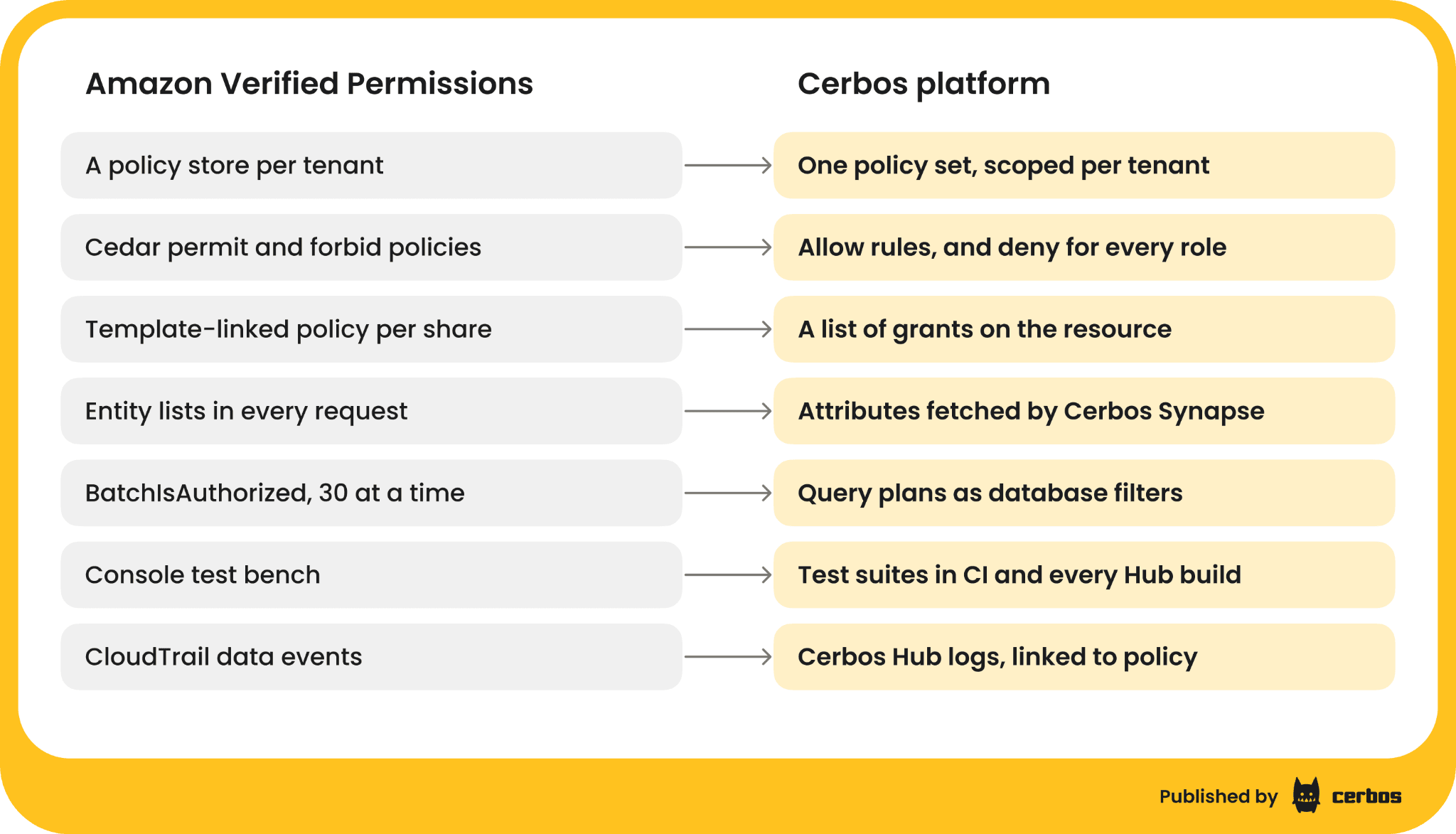
The policy store, the IsAuthorized API, the entity lists and the CloudTrail trail become parts of one Cerbos platform.
-
Policy stores become policy files in Git or Cerbos Hub policy stores. Cerbos Hub builds, tests and distributes them to every decision point, hosted or on-premise for enterprise customers. A store per tenant becomes one set of policies with scoped policies for tenant exceptions.
-
The IsAuthorized API becomes Cerbos decision points next to your workloads, inside AWS Lambda, on ECS, EKS or EC2, on another cloud or on-premise, all under one set of policies, so authorization is no longer tied to AWS. They hold policy, not your user or resource data, and keep serving the last policy they received if Cerbos Hub is unreachable.
-
Entity lists become request attributes, token claims, and Cerbos Synapse data sources that fetch identity, resource and relationship data at decision time, including Amazon Cognito groups and attributes.
-
Template-linked policies become lists on the resource, such as the people a document is shared with as editors (the Cedar migration guide shows the rule that reads the list).
-
The console test bench becomes Cerbos test suites, YAML files next to the policies that run in any CI system and that Cerbos Hub runs before every build.
-
CloudTrail data events become decision logs from every decision point, collected by Cerbos Hub and linked to the policy version behind each decision.
-
BatchIsAuthorized for lists becomes query plans, which return the policy as a filter your database applies.
How Cerbos organizes the rules your policy stores hold today
Policies are organized by resource. A resource policy holds every rule for one kind of resource, such as document, with the actions it supports. Shared logic lives in derived roles, which play the part of Cedar conditions you repeat across policies, and in variables.
Everything is denied unless a rule allows it, as in Cedar.
A deny for every role overrides any allow. Cedar's forbid always wins over a permit. In Cerbos, write the forbid as a deny rule for roles: ["*"] and it wins over every allow for that action, whichever role granted it.
Requests carry attributes, not an entity graph. The principal (P) and the resource (R) carry typed attributes, strings, numbers, booleans, lists and maps, and CEL conditions read them directly. Parents and hierarchy arrive as attributes, such as a list of folder IDs, sent by the application or fetched by Cerbos Synapse.
Grants are data. A share is a value on the record, not a new policy. One rule reads the list.
Amazon Verified Permissions to Cerbos concept mapping
| Amazon Verified Permissions and Cedar | Cerbos | Notes |
|---|---|---|
| Policy store | A Cerbos Hub policy store, or a folder of policy files in Git | One set of policies for every tenant |
| Policy store per tenant | One set of policies, with scoped policies for tenant exceptions | Shared changes ship once |
| Schema (entity types, attributes, actions) | Schemas for principal and resource attributes, actions listed in the resource policy | Checked before the policy runs |
| Entity type | A resource kind, or the principal | DocApp::Document becomes the document resource policy |
| Entity attributes | P.attr and R.attr on the request |
Typed values |
Entity parents and in |
Attributes holding the parent IDs, sent or fetched by Cerbos Synapse | No 100-parent limit |
permit |
A rule with EFFECT_ALLOW |
|
forbid |
A rule with EFFECT_DENY for roles: ["*"] |
Wins over every allow for the action |
context |
Principal or resource attributes, or auxData for token claims |
|
| Policy templates and template-linked policies | A list on the resource, read by a derived role | No policy per share |
| Identity source (Cognito user pool, OIDC) | Tokens verified by Cerbos through auxData, with the application passing the user’s groups as roles, or Cerbos Synapse fetching them |
See JWT claims |
| IsAuthorized | CheckResources (isAllowed in the SDKs) |
Several actions and resources in one call |
| IsAuthorizedWithToken | CheckResources with the token in auxData |
|
| BatchIsAuthorized | CheckResources with many resources, or PlanResources for lists |
Up to 50 resources per request by default, configurable, and no cap for query plans |
determiningPolicies in the response |
The decision log entry and the playground trace | Linked to the policy version |
| Console test bench | YAML test suites, cerbos compile, and every Cerbos Hub build |
Run in CI |
| CloudTrail data events | Decision logs collected by Cerbos Hub | Searchable and exportable |
| Lambda authorizer for API Gateway | The Cerbos Lambda authorizer for Amazon API Gateway | Same gateway, different decision service |
The table covers how Verified Permissions maps to Cerbos. For the rest of the Cedar language, such as like patterns, extension types and namespaces, the Cedar to Cerbos mapping goes construct by construct.
Getting your policies out of Amazon Verified Permissions
Verified Permissions has no export command. The policies, templates and schema come out through the API, one policy store at a time, and the AWS CLI is enough.
STORE=ps-EXAMPLE1234567890
mkdir -p avp-export/policies avp-export/templates


# The schema, as Cedar JSON schema
aws verifiedpermissions get-schema --policy-store-id "$STORE" \
 --query schema --output text > avp-export/schema.json


# Every policy template
for id in $(aws verifiedpermissions list-policy-templates --policy-store-id "$STORE" \
   --query 'policyTemplates[].policyTemplateId' --output text); do
 aws verifiedpermissions get-policy-template --policy-store-id "$STORE" \
   --policy-template-id "$id" --query statement --output text \
   > "avp-export/templates/$id.cedar"
done


# Every policy, static and template-linked
for id in $(aws verifiedpermissions list-policies --policy-store-id "$STORE" \
   --query 'policies[].policyId' --output text); do
 aws verifiedpermissions get-policy --policy-store-id "$STORE" \
   --policy-id "$id" --output json > "avp-export/policies/$id.json"
done
Static policies come back with their Cedar statement. Template-linked policies come back as a template ID plus the principal and resource they were linked to, and those pairs are your grants data, the rows that become lists on each resource. If you run a store per tenant, run the script for each store, and compare the static policies across stores. Rules that are the same everywhere become the shared Cerbos policy, and the differences become scoped policies.
Use the export as a reference for what the rules are, not as input to a converter. Write the rules in plain words first, one resource type at a time, agree them with the person who owns that part of the product, then write the Cerbos policy and its tests.
Translating a policy store per tenant to Cerbos, with a test
Per-tenant stores are where Verified Permissions setups differ most from Cerbos, so they make the clearest example. Say every tenant’s store holds the same rule, that managers can view and approve invoices. One customer, Acme, negotiated an extra rule in its own store, that nobody approves an invoice they submitted.
// In every tenant's policy store
permit (
 principal,
 action in [Billing::Action::"view", Billing::Action::"approve"],
 resource
)
when { principal.role == "manager" };
// Only in Acme's policy store
forbid (
 principal,
 action == Billing::Action::"approve",
 resource
)
when { resource.submittedBy == principal };
In Cerbos, the shared rule is written once, and Acme's rule becomes a scoped policy that applies only to resources in the acme scope.
# resources/invoice.yaml
apiVersion: api.cerbos.dev/v1
resourcePolicy:
 version: default
 resource: invoice
 rules:
   - name: managers-view-and-approve
     actions: ["view", "approve"]
     effect: EFFECT_ALLOW
     roles: ["manager"]
# resources/invoice_acme.yaml
apiVersion: api.cerbos.dev/v1
resourcePolicy:
 version: default
 resource: invoice
 scope: acme
 rules:
   # Acme's forbid, a deny for every role
   - name: no-self-approval
     actions: ["approve"]
     effect: EFFECT_DENY
     roles: ["*"]
     condition:
       match:
         expr: R.attr.submittedBy == P.id
Write the decisions that must hold today as a test suite. Here, Maria is a manager. At Globex she can approve an invoice she submitted, and at Acme she cannot, though she can still approve a colleague's.
# tests/invoice_test.yaml
name: InvoiceTestSuite
principals:
 maria:
   id: maria
   roles: ["manager"]
resources:
 globex_own:
   kind: invoice
   id: globex-1
   attr: { submittedBy: maria }
 acme_own:
   kind: invoice
   id: acme-1
   scope: acme
   attr: { submittedBy: maria }
 acme_colleague:
   kind: invoice
   id: acme-2
   scope: acme
   attr: { submittedBy: tom }
tests:
 - name: Acme's extra rule applies only to Acme
   input:
     principals: ["maria"]
     resources: ["globex_own", "acme_own", "acme_colleague"]
     actions: ["view", "approve"]
   expected:
     - principal: maria
       resource: globex_own
       actions: { view: EFFECT_ALLOW, approve: EFFECT_ALLOW }
     - principal: maria
       resource: acme_own
       actions: { view: EFFECT_ALLOW, approve: EFFECT_DENY }
     - principal: maria
       resource: acme_colleague
       actions: { view: EFFECT_ALLOW, approve: EFFECT_ALLOW }
Run cerbos compile locally or in CI, or let Cerbos Hub run the suite before it builds the deployment, and the policies only ship when the tests pass. A change to the managers rule now ships once for every tenant, instead of being replicated to every store. The Cedar migration guide translates a whole Cedar policy set the same way, owners, sharing, a template for editors and a forbid, with a 21-test suite.
If your team works with an AI coding agent, the Cerbos agent skills help with the rewrite. Install them with npx skills add cerbos/skills, give the agent your rules written in plain words, and it writes each one as a Cerbos policy with a test suite and runs the tests until they pass. There is a guide for doing this in AWS Kiro. Your reviewers still approve every policy before it ships.
Where your Amazon Verified Permissions entity data goes
The example's one attribute, who submitted the invoice, came with the record. Most of yours will not. List every entity type and attribute your policies read, and for each one write down which code builds it today.
-
Attributes of the record being checked, such as owner, tenant or who submitted it. Send them from the row the application already loaded, as resource attributes.
-
Groups and claims from your identity provider. Send the token in
auxDataso Cerbos verifies it, and pass the groups as roles, or let Cerbos Synapse fetch the user’s Cognito profile at decision time, as we show in looking up identity attributes at decision time. -
Parents and hierarchies, such as the folders above a document or the groups a user belongs to. Let a Cerbos Synapse data source read them from the database or a graph and return the answer as an attribute. The hierarchy is resolved before the policy runs, so the policy reads a ready list of IDs, with no 100-parent limit.
-
Template links. Load the grant rows from the export as a list on the resource, such as an
editorslist of everyone a document is shared with. -
Context. The client's IP address and other context become attributes. Time rules use
now().
For each item, also write down how stale it is allowed to be. That list tells you what to cache in Synapse and for how long, and it is what your audit team will want to see.
Replacing Amazon Verified Permissions calls with Cerbos
IsAuthorized becomes CheckResources
An IsAuthorized call names the principal, the action and the resource, and carries every entity the policies read. In Cerbos the same question carries attributes.
// Before, Amazon Verified Permissions
const { decision } = await avp.send(
 new IsAuthorizedCommand({
   policyStoreId: POLICY_STORE_ID,
   principal: { entityType: "DocApp::User", entityId: user.id },
   action: { actionType: "DocApp::Action", actionId: "edit" },
   resource: { entityType: "DocApp::Document", entityId: doc.id },
   entities: {
     entityList: [
       {
         identifier: { entityType: "DocApp::User", entityId: user.id },
         attributes: {
           tenant: { entityIdentifier: { entityType: "DocApp::Tenant", entityId: user.tenantId } },
         },
       },
       {
         identifier: { entityType: "DocApp::Document", entityId: doc.id },
         attributes: {
           owner: { entityIdentifier: { entityType: "DocApp::User", entityId: doc.ownerId } },
           tenant: { entityIdentifier: { entityType: "DocApp::Tenant", entityId: doc.tenantId } },
           sharedWithTenant: { boolean: doc.sharedWithTenant },
           legalHold: { boolean: doc.legalHold },
         },
       },
     ],
   },
 }),
);
const allowed = decision === "ALLOW";


// After, Cerbos
const allowed = await cerbos.isAllowed({
 principal: { id: user.id, roles: ["user"], attr: { tenant: user.tenantId } },
 resource: {
   kind: "document",
   id: doc.id,
   attr: {
     owner: doc.ownerId,
     tenant: doc.tenantId,
     sharedWithTenant: doc.sharedWithTenant,
     legalHold: doc.legalHold,
     editors: doc.editorIds,
   },
 },
 action: "edit",
});
Put the call behind one function in each service, so the swap is one change per service. The template links that lived in the policy store now travel as editors, loaded with the document. To check several documents or actions at once, checkResources takes a list of resources, each with its own actions, in one call, up to 50 resources per request by default, and the limit is configurable. Cerbos SDKs exist for eight languages, plus Laravel. If you would rather keep a standard request format, Cerbos PDP and Cerbos Synapse accept AuthZEN requests. Alex Olivier, our cofounder and CPO, co-chairs the AuthZEN Working Group.
BatchIsAuthorized for lists becomes PlanResources
If you build lists by checking candidates in batches of 30 (the BatchIsAuthorized limit, per AWS documentation read in October 2026), replace them with a query plan. PlanResources returns the policy as a condition, and a query plan adapter adds it to your existing query, so the database returns only the rows the person may see, sorted and paginated.
// After, Cerbos with the Prisma adapter
import { PlanKind, queryPlanToPrisma } from "@cerbos/orm-prisma";


const plan = await cerbos.planResources({
 principal,
 resource: { kind: "document" },
 action: "view",
});
const result = queryPlanToPrisma({
 queryPlan: plan,
 mapper: {
   "request.resource.attr.owner": { field: "ownerId" },
   "request.resource.attr.tenant": { field: "tenantId" },
   "request.resource.attr.sharedWithTenant": { field: "sharedWithTenant" },
   // map every attribute your policies read, or the query fails on an unmapped path
   // editors: map to your document editors relation, per the Prisma adapter docs
 },
});
const docs =
 result.kind === PlanKind.ALWAYS_DENIED
   ? []
   : await prisma.document.findMany({
       where: result.kind === PlanKind.CONDITIONAL ? result.filters : {},
       orderBy: { updatedAt: "desc" },
       take: 50,
     });
Adapters cover Prisma, Drizzle, Mongoose, Convex, SQLAlchemy and LangChain with ChromaDB. ACES, which moved to Cerbos after comparing it with Verified Permissions, wrote (in Japanese) about why they ruled out post-filtering, since it breaks pagination and total counts.
IsAuthorizedWithToken and Cognito
If you call IsAuthorizedWithToken with a Cognito token, send the same token to Cerbos in auxData. Cerbos verifies it against your user pool’s keys, and the application passes the user’s Cognito groups as roles. See using Amazon Cognito with Cerbos.
The API Gateway Lambda authorizer
If a Lambda authorizer in front of Amazon API Gateway calls Verified Permissions today, keep the gateway and swap the authorizer for the Cerbos API Gateway integration, a Lambda authorizer that evaluates Cerbos policies. The routes, the identity provider and the services behind the gateway stay as they are.
Porting tests from the Verified Permissions test bench
The console test bench runs one request at a time. Write each scenario you checked there as an entry in a Cerbos test suite, a principal, a resource, an action and the expected effect. Because the suites are files, they run in CI on every pull request and in Cerbos Hub before every build.
If you have few tests, build them from production. With CloudTrail data events on, take a sample of real requests and their Verified Permissions decisions and turn them into fixtures. That gives you the decisions that actually happen, not the ones someone remembered to test.
Aaron Maier, Lead Software Developer at BarrierSystems, on testing their authorization rules after moving to Cerbos, "Cerbos gave us the ability to test more specific things, like if a button is visible for a certain user."
Running Cerbos beside Amazon Verified Permissions in shadow mode
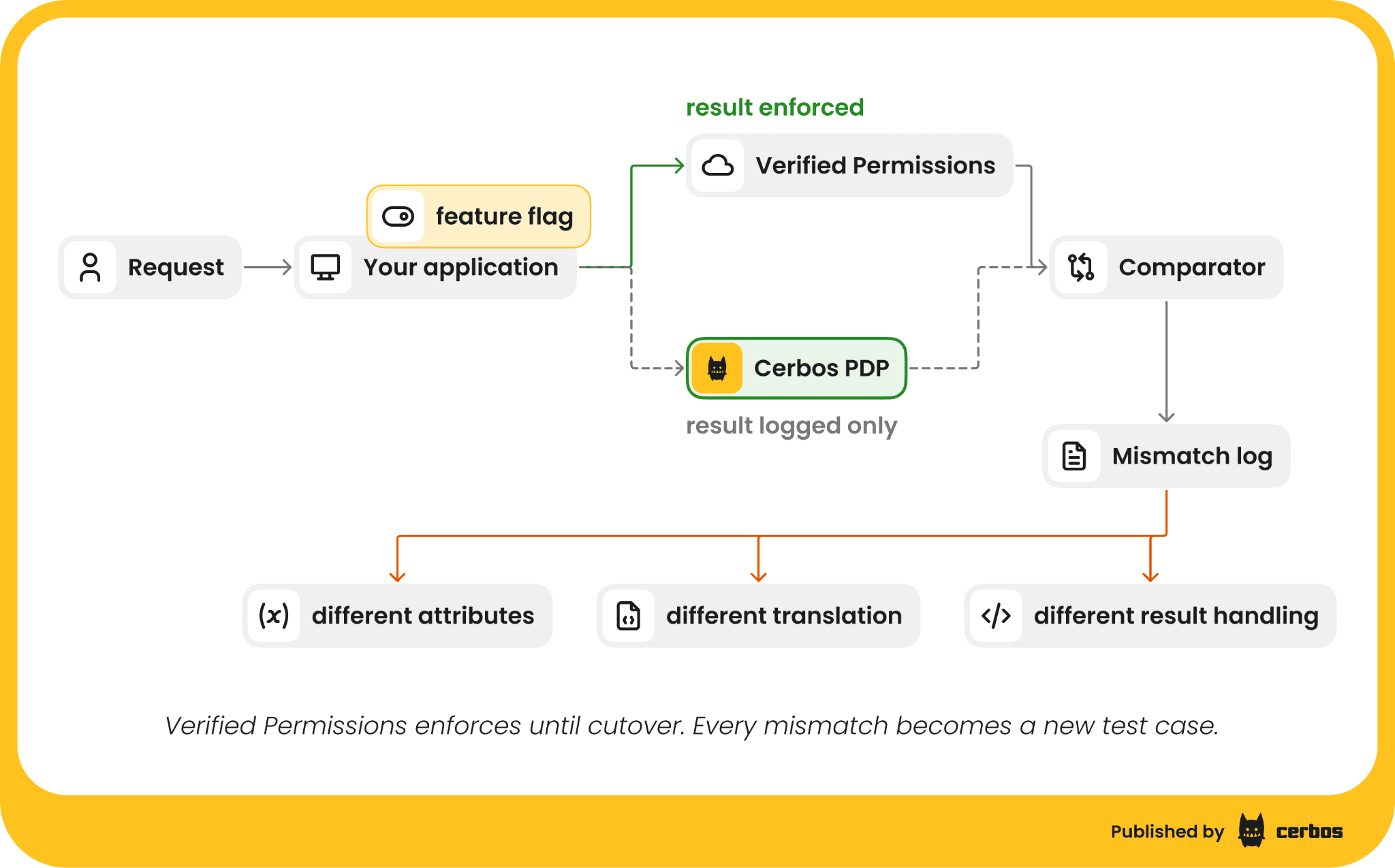
Before Cerbos enforces anything, run both on the same requests and compare. Keep enforcing Verified Permissions' answer, ask Cerbos the same question, and log every disagreement with the inputs.
async function canEdit(user: User, doc: Doc): Promise<boolean> {
 const avpResult = await avp.send(toIsAuthorized(user, doc, "edit"));
 const avpAllowed = avpResult.decision === "ALLOW";


 // Ask Cerbos off the request path. Its answer, slowness or failure never changes the result.
 cerbos
   .isAllowed({ principal: toPrincipal(user), resource: toResource(doc), action: "edit" })
   .then((cerbosAllowed) => {
     if (cerbosAllowed !== avpAllowed) {
       logger.warn("authorization mismatch", {
         user: user.id, document: doc.id, action: "edit",
         verifiedPermissions: avpAllowed, cerbos: cerbosAllowed,
         determiningPolicies: avpResult.determiningPolicies,
       });
     }
   })
   .catch((err) => logger.warn("cerbos shadow check failed", { error: String(err) }));


 return avpAllowed; // Verified Permissions still enforces
}
Every mismatch has a cause. The usual ones are an attribute the Cerbos request did not carry, a parent that the entity list included and the attributes did not, a template link that was not loaded into the list, or a forbid translated without roles: ["*"]. Count Cerbos errors and timeouts separately from mismatches, so a network problem never reads as a policy difference.
In Lambda, await the shadow call with a short timeout, or send the comparison to a queue, because work left running after the handler returns may not complete. The determiningPolicies Verified Permissions returns name the Cedar policy behind its side of each mismatch, and the Cerbos decision log shows the inputs and the policy behind the other. Agree the exit bar with your security team before you start, for example no unexplained mismatch over two weeks of production traffic for the service.
Shadow your lists too. For a sample of users, compare what the batch checks returned with the rows the query plan returns.
Switching over and decommissioning Amazon Verified Permissions
Cut over one service at a time, behind a feature flag, once it meets the exit bar. Flip the flag so Cerbos enforces, keep logging comparisons for a few days, and keep the policy store in place so you can flip back. When every service that uses a store has moved, export the store one last time for your records, keep the CloudTrail events your regulators require, and delete the store. Write down the date each service moved, so an auditor can see which system evaluated each request on which day. Your sign-in and your AWS accounts stay as they are throughout.
Common challenges when migrating from Amazon Verified Permissions, and how to solve them
Forbids that override everything. Every Cedar forbid becomes a Cerbos deny for roles: ["*"]. A deny scoped to one role only overrides allows for that role, so check each forbid's test cases with a principal that holds several roles.
A policy for every share. Template-linked policies can number in the thousands. Load them from the export into a grants table once, and from then on a share is a row, not a policy.
Deep hierarchies. Verified Permissions caps entity parents at 100 (AWS documentation, read October 2026). Let Cerbos Synapse resolve the hierarchy from the database or a graph and return the result as an attribute.
A store per tenant. Diff the static policies across stores. The common rules become one shared policy, and each tenant's differences become a scoped policy.
Planning your migration from Amazon Verified Permissions
Start with a service whose entity data is already loaded with the record, and that has a list built from batch checks, so the first move both proves the decisions match and replaces the batching with a query plan. Settle the request shape and the attribute list there, then reuse them for the harder services.
Try Cerbos with the first service you plan to move. Your engineers delete the entity assembly and the batch loops, your identity team keeps every group and claim in your identity provider and every service reads them at decision time, and your security team gets a log of every decision during shadow mode to show the new rules match the old ones.
To plan the move from Amazon Verified Permissions, book a call with us and bring the export from one policy store. We will go through which rules become shared policy, which become tenant exceptions, and which entity data Cerbos Synapse can fetch for you.
Go deeper:
-
How to adopt externalized authorization (eBook), for a step by step plan to move authorization out of application code
FAQ
Tagged in